

Everything You Need to Know About Date in JavaScript
Jul 05, 2019

When I investigated how to write unit tests for API in NodeJS, most of the articles I found that mention how to implement with Mocha, Chai, istanbul, etc… Just a little bit topics talk about Jest, one of the famous and robust testing framework from Facebook. If we can integrate with Jest into our project, we don’t need to combine several libraries above. Jest has built-in functionalities support for snapshot testing, matchers and coverage as well.
One more thing in this section, we won’t mock our database. Instead, we’ll run tests with database test. We can mock database, of course, for a simpler solution. However, we’ll try a little bit harder than normal to see all of those things can work well or not.
Require Packages
jest: for sure, our main package in this sectionsupertest: we gonna test all our controllers, so this package looks like a high-level abstraction for testing HTTP.supertest-as-promise: as Promised supercharges supertest with a then method. You can take a look more details here.Install jest package through npm
$ npm install --save-dev jest supertest supertest-as-promiseModify package.json as following:
{
  "scripts": {
    "start": "nodemon ./app.js",
    "pretest": "NODE_ENV=test ./node_modules/.bin/sequelize db:create && ./node_modules/.bin/sequelize db:migrate ",
    "test": "NODE_ENV=test jest --testPathPattern='./tests/.*\\.test\\.js$' --detectOpenHandles --runInBand --forceExit"
  },
  ...
  "devDependencies": {
    "jest": "^23.6.0",
    "supertest": "^3.3.0",
    "supertest-as-promised": "^4.0.2"
  },
  "jest": {
    "setupTestFrameworkScriptFile": "<rootDir>/config/jest/setup.js"
  }
}
Look at details test inside scripts
"scripts": {
  "test": "NODE_ENV=test jest --testPathPattern='./tests/.*\\.test\\.js$' --detectOpenHandles --runInBand --forceExit"
}
NODE_ENV=test setup node’s environment to test.--testPathPattern='./tests/.*\\.test\\.js$' we’ll run test for all the file has name include test inside tests folder. For example, a file name is task.controller.test.js.--detectOpenHandles one optional option to collect and print open handles preventing Jest from exiting cleanly.--runInBand important option! We gonna run test with a database test, not mocking it. It will make sure that Jest won’t execute our tests parallel but in sequence instead. Running tests parallel can lead to read/write problems with our database.--forceExit helps Jest exit in case it can’t exit when all tests have finished."scripts": {
"pretest": "NODE_ENV=test ./node_modules/.bin/sequelize db:create && ./node_modules/.bin/sequelize db:migrate "
}pretest means that it’ll run before we run script test. Inside prescript script, we want to initialize our database test.
"jest": {
  "setupTestFrameworkScriptFile": "<rootDir>/config/jest/setup.js"
}
setupTestFrameworkScriptFile link to one file will be called to execute before each test (as Jest document). We’ll add some stuff such as setup or cleanup database before running new test case.
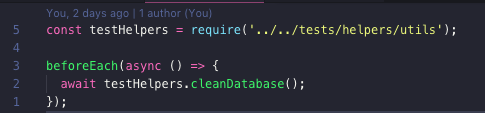
Inside /config/jest/setup.js file, we want to clean our database test before running one new test. It helps our test more consistent with a clean database.
I create a new folder tests inside our root project. We’ll put all file tests and test helpers inside that folder.
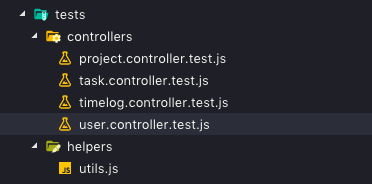
Let’s take a look one example writing tests for user controller:
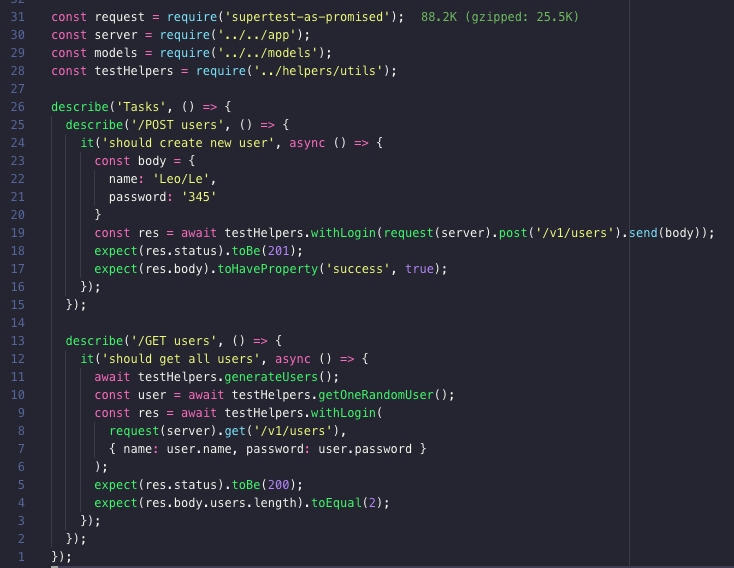
All these codes here quite clear themselves. In case we want to create a new user, we’ll send a POST request with body includes name and password values to /v1/users API endpoint. We have testHelpers.withLogin method to help us can send an authenticated request.
Similar to get all users in our application. We’ll send an authenticated GET request to /v1/users API endpoint. testHelpers.generateUsers() will generate a list of users for us in the beginning.
All the tests for other controllers are the same. You can take a look details in project repository.
At this time, our project can launch smoothly in our local. Next step is excited when we bring our product to go live. See you there.


